This post demonstrates how to capture data change (CDC) from Postgres and publish it to Kafka using Debezium as the CDC tool.
This article was originally published on Medium.
The challenge
In large enterprises, data is stored in multiple databases. I have seen too many times codes that send the same data to multiple databases. Like this:
relational_db.save(data)
nosql_db.save(data)
search_engine.save(data)
There are big challenges with this approach:
- Consistency: How to keep consistency between these databases? How to deal with the failure of one of these databases? And if the ordering of the data is important?
- Scalability: How to deal with scalability when the performance depends on the slowest database?
- Complexity: The code is complex and hard to maintain. Imagine many points in the code and others microservices doing the same thing.
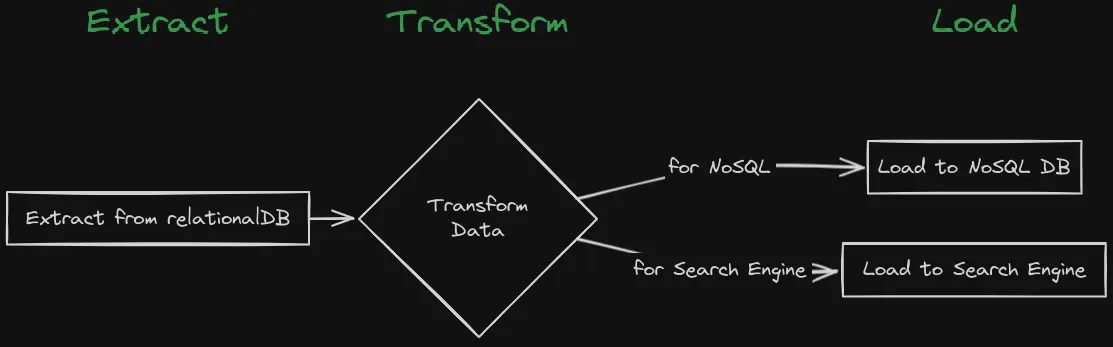
The traditional way to keep consistency between these databases is to use the ETL (Extract, Transform, Load) process. The ETL process is a batch-oriented process that extracts data from the source database, transforms the data, and loads the data into the target database. The ETL process has some limitations, like the ETL process is batch-oriented, which means it can’t provide real-time data synchronization. The ETL process is also complex and expensive.
Change Data Capture (CDC)
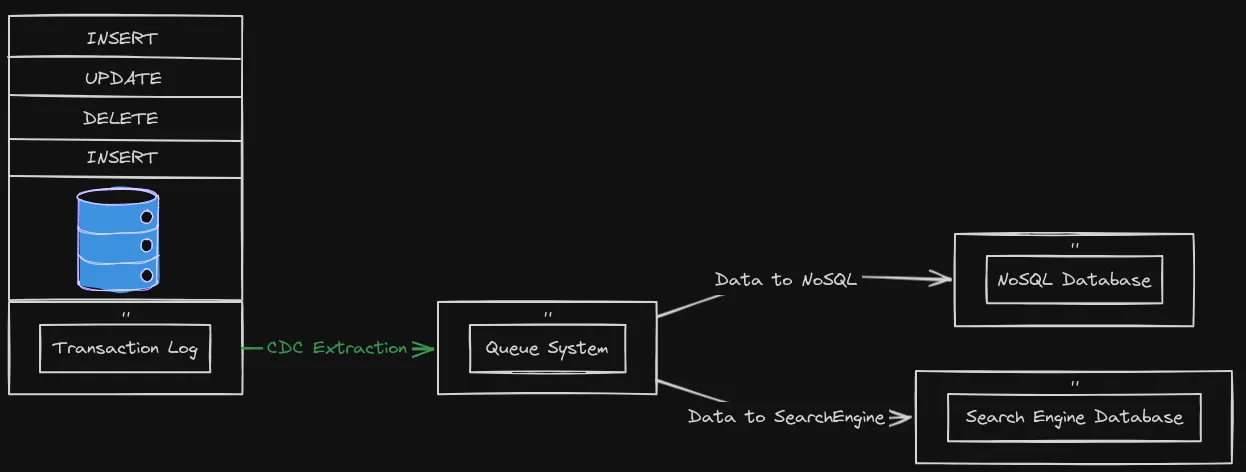
Change Data Capture, or CDC, is an older term for a system that monitors and captures the changes in data so that other software can respond to those changes. Data warehouses often had built-in CDC support, since data warehouses need to stay up-to-date as the data changed in the upstream OLTP databases.
Using Debezium as a CDC tool
Debezium is a set of distributed services that capture row-level changes in your databases so that your applications can see and respond to those changes. Debezium records in a transaction log all row-level changes committed to each database table. Each application simply reads the transaction logs they’re interested in, and they see all of the events in the same order in which they occurred.
You can check which databases Debezium supports here.
You can output the data change to different sinks like Kafka, Amazon Kinesis, Google Cloud Pub/Sub, etc.
In this post I will use Debezium Postgres connector via Kafka Connect.
Let’s set up the required components - Zookeeper, Kafka, PostgreSQL, and Connect - to see Debezium in action using individual docker run commands.
Zookeeper
Zookeeper is a centralized service for maintaining configuration information, naming, providing distributed synchronization, and providing group services. Let’s start by running Zookeeper:
docker run - rm \
 - name zookeeper \
 -p 2181:2181 \
 debezium/zookeeper:2.1
Kafka
Kafka is a distributed streaming platform that is commonly used for building real-time streaming data pipelines and applications.
docker run - rm \
 - name kafka \
 -p 9092:9092 \
 - env ZOOKEEPER_CONNECT=zookeeper:2181 \
 - link zookeeper \
 debezium/kafka:2.1
PostgreSQL
Let’s launch a PostgreSQL instance:
docker run - rm \
 - name postgres \
 -p 5432:5432 \
 - env POSTGRES_PASSWORD=postgres \
 - env POSTGRES_HOST_AUTH_METHOD=trust \
 - env POSTGRES_USER=postgres \
 postgres:15.2-alpine3.17
Let’s change the wal_level to logical in the postgresql.conf file. PostgreSQL’s logical decoding feature was introduced in version 9.4. It is a mechanism that allows the extraction of the changes that were committed to the transaction log and the processing of these changes in a user-friendly manner with the help of an output plug-in. The output plug-in enables clients to consume the changes.
- Open a bash shell in the PostgreSQL container:
docker exec -it postgres bash- Find the postgresql.conf file:
find / -name postgresql.conf- Edit the postgresql.conf file, uncomment the wal_level line, and set it to logical
wal_level = logical- Exit and restart the PostgreSQL container:
docker restart postgresCreate a database and table
Let’s create a database and table in PostgreSQL:
- Open a psql shell in the PostgreSQL container:
docker exec -it postgres psql -U postgres- Create a database and table, and insert some data:
CREATE DATABASE inventory;
\c inventory;
CREATE EXTENSION IF NOT EXISTS "uuid-ossp";
CREATE TABLE products (
 id UUID PRIMARY KEY DEFAULT uuid_generate_v4(),
 name TEXT NOT NULL,
 weight FLOAT NOT NULL,
 created_at TIMESTAMPTZ NOT NULL DEFAULT now()
);
INSERT INTO
 products (name, weight)
VALUES
 ('scooter', 3.14),
 ('car battery', 8.1),
 ('12-pack drill bits', 0.8),
 ('hammer', 0.75);
Debezium Connect
Debezium Connect is a distributed service that captures row-level changes in your databases so that your applications can see and respond to those changes. Debezium Connect uses Kafka Connect to capture row-level changes in your databases. Kafka Connect is a framework for connecting Kafka with external systems such as databases, key-value stores, search indexes, and file systems.
- Let’s start Debezium Connect:
docker run - rm \
 - name connect \
 -p 8083:8083 \
 - env CONFIG_STORAGE_TOPIC=connect_configs \
 - env OFFSET_STORAGE_TOPIC=connect_offsets \
 - env STATUS_STORAGE_TOPIC=connect_statuses \
 - env BOOTSTRAP_SERVERS=kafka:9092 \
 - link kafka \
 - link postgres \
debezium/connect:2.1- Register the Debezium Postgres connector:
curl -i -X POST -H "Accept:application/json" -H "Content-Type:application/json" localhost:8083/connectors/ -d '{
 "name": "inventory-connector",
 "config": {
 "connector.class": "io.debezium.connector.postgresql.PostgresConnector",
 "database.hostname": "postgres",
 "database.port": "5432",
 "database.user": "postgres",
 "database.password": "postgres",
 "database.dbname": "inventory",
 "topic.prefix": "inventory",
 "plugin.name": "pgoutput"
 }
}'
Let’s check the status of the connector:
curl -H "Accept:application/json" localhost:8083/connectors/inventory-connector/statusIf the connector is running, you should see a response like this:
{"name":"inventory-connector","connector":{"state":"RUNNING","worker_id":"172.17.0.5:8083"},"tasks":[{"id":0,"state":"RUNNING","worker_id":"172.17.0.5:8083"}],"type":"source"}Let’s check the topics created by the connector:
docker exec connect /kafka/bin/kafka-topics.sh - bootstrap-server kafka:9092 - listYou should see the inventory.public.products topic.
Now, let’s consume the inventory.public.products topic:
docker exec connect /kafka/bin/kafka-console-consumer.sh - bootstrap-server kafka:9092 - topic inventory.public.products - from-beginningYou can see some data in the inventory.public.products topic. The data is the snapshot of the products table in the inventory database. For default, the Debezium Postgres connector uses the snapshot.mode property set to initial. The initial mode means that the connector will perform an initial consistent snapshot of the database.
Let’s analyze the data in the inventory.public.products topic:
{
 "schema": {…},
 "payload": {…}
}
The schema field specifies a Kafka Connect schema that describes the structure of the data. The payload field contains the actual data.
Let’s dig into the payload field:
{
  "schema": {…},
  "payload": {
    "before": null,
    "after": {
      "id": "8eb22f16–1763–4023–8b61–6b6bc21b8e8f",
      "name": "hammer",
      "weight": 0.75,
      "created_at": "2024–04–13T17:04:10.581758Z"
    },
    "source": {
      "version": "2.1.4.Final",
      "connector": "postgresql",
      "name": "inventory",
      "ts_ms": 1713056376651,
      "snapshot": "last",
      "db": "inventory",
      "sequence": "[null,\"26842648\"]",
      "schema": "public",
      "table": "products",
      "txId": 741,
      "lsn": 26842648,
      "xmin": null
    },
    "op": "r",
    "ts_ms": 1713056376796,
    "transaction": null
  }
}
Now, the important field is the op field. The op field specifies the operation that was performed on the row. The “r” value means that the row was read by the snapshot process.
Let’s change the data in the products table to see the data change in the inventory.public.products topic:
docker exec postgres psql -U postgres -d inventory -c "UPDATE products SET weight = 0.5 WHERE name = 'hammer'"The inventory.public.products topic should now contain the data change.
{
  "schema": {…},
  "payload": {
    "before": null,
    "after": {
      "id": "8eb22f16–1763–4023–8b61–6b6bc21b8e8f",
      "name": "hammer",
      "weight": 0.5,
      "created_at": "2024–04–13T17:04:10.581758Z"
    },
    "source": {…},
    "op": "u",
    "ts_ms": 1713059333521,
    "transaction": null
  }
}
The op field now has the “u” value, which means that the row was updated. The after field contains the updated data. The before field contains “null”. Sometimes you want to see the previous data for some table. You must change the REPLICA IDENTITY of the table. Also, see the Debezium documentation for more information.
Changing the REPLICA IDENTITY of the products table to FULL will make the before field contain the previous data on update and delete operations:
docker exec postgres psql -U postgres -d inventory -c "ALTER TABLE products REPLICA IDENTITY FULL"Now, let’s update the products table again:
docker exec postgres psql -U postgres -d inventory -c "UPDATE products SET weight = 1.5 WHERE name = 'hammer'"The inventory.public.products topic should now contain the data change:
{
  "schema": {…},
  "payload": {
    "before": {
      "id": "8eb22f16–1763–4023–8b61–6b6bc21b8e8f",
      "name": "hammer",
      "weight": 0.5,
      "created_at": "2024–04–13T17:04:10.581758Z"
    },
    "after": {
      "id": "8eb22f16–1763–4023–8b61–6b6bc21b8e8f",
      "name": "hammer",
      "weight": 1.5,
      "created_at": "2024–04–13T17:04:10.581758Z"
    },
    "source": {…},
    "op": "u",
    "ts_ms": 1713102044174,
    "transaction": null
  }
}
Now the before field will contain the previous data on update and delete operations.
Conclusion
In this cookbook, we learned how to capture data change from Postgres and publish it to Kafka using Debezium. Debezium is a powerful tool that can help you keep consistency between your databases. Debezium can capture data change from different databases like MySQL, Postgres, MongoDB, etc. Debezium can output the data change to different sinks like Kafka, Amazon Kinesis, Google Cloud Pub/Sub, etc.
For production environments, you will deal with more complex scenarios like high availability, monitoring, scaling, table schema changes, etc.
Thanks for reading!