I originally wrote and published this article on Medium.
In my previous post, Exploring ClickHouse: A Beginner’s Journey, I covered some ClickHouse fundamentals, a Docker-first setup, and creating and working with a simple entities table. We touched on ReplacingMergeTree for deduplication and versioning, plus practical inserts and queries.
Here the goal is a hands-on example: using ClickHouse to implement a simplified segmentation system similar to what you might see in a Customer Data Platform (CDP). The focus is showing how user-defined functions (UDFs) in ClickHouse can express complex filtering rules and produce segments.
Disclaimer: The code here is for learning only and is not recommended for production. For large data volumes or real workloads, there are more robust and optimized approaches. This example is heavily inspired by the talk Rebuilding Segmentation with ClickHouse - Patrick McGrath (Klaviyo).
What is a CDP?
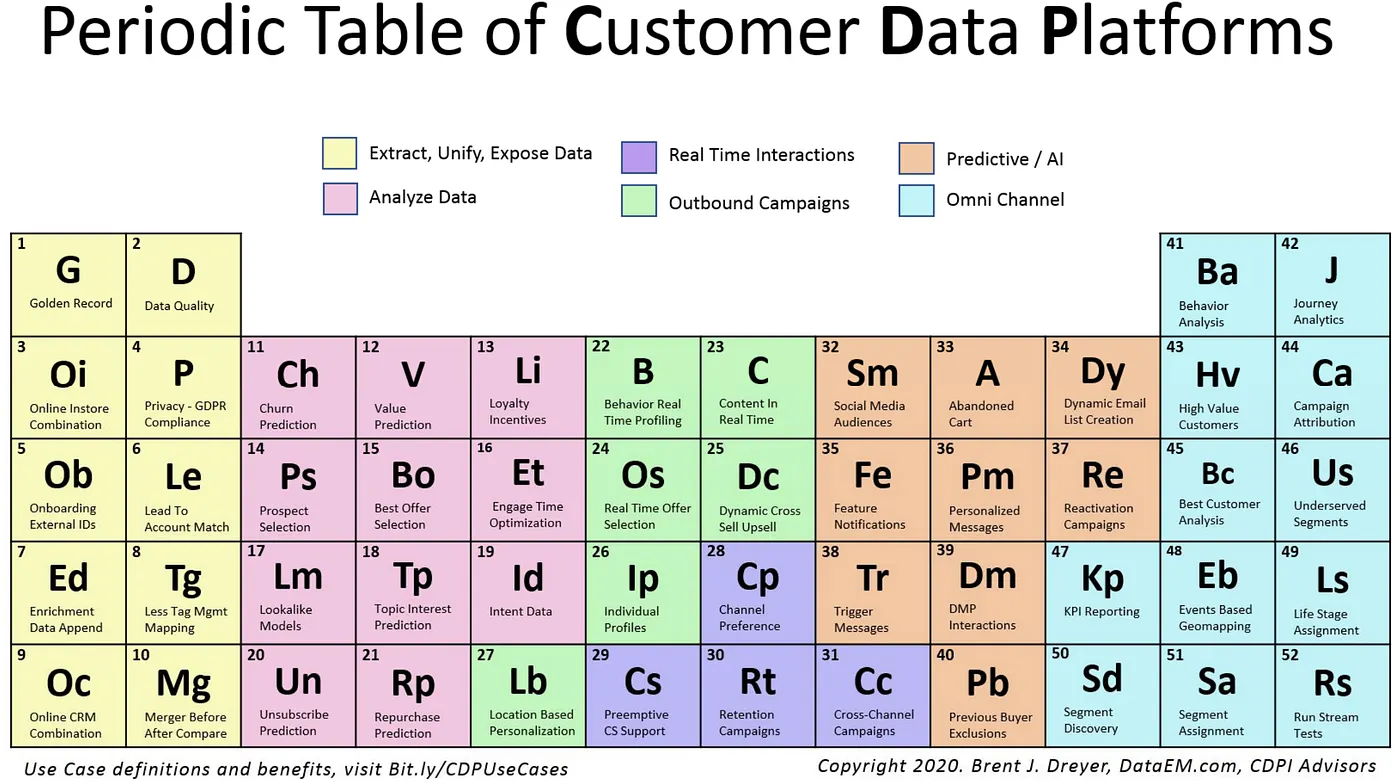
A Customer Data Platform (CDP) is a marketing technology concept aimed at unifying customer data from many sources into single, centralized profiles. Those profiles help model behavior, analyze data, and share information with downstream systems that need it - supporting personalization and near–real-time decisions. According to DataEM’s material, CDPs are grouped by goals such as data management, analytics and measurement, predictive optimization, demand generation, real-time interactions, and omnichannel decision orchestration.
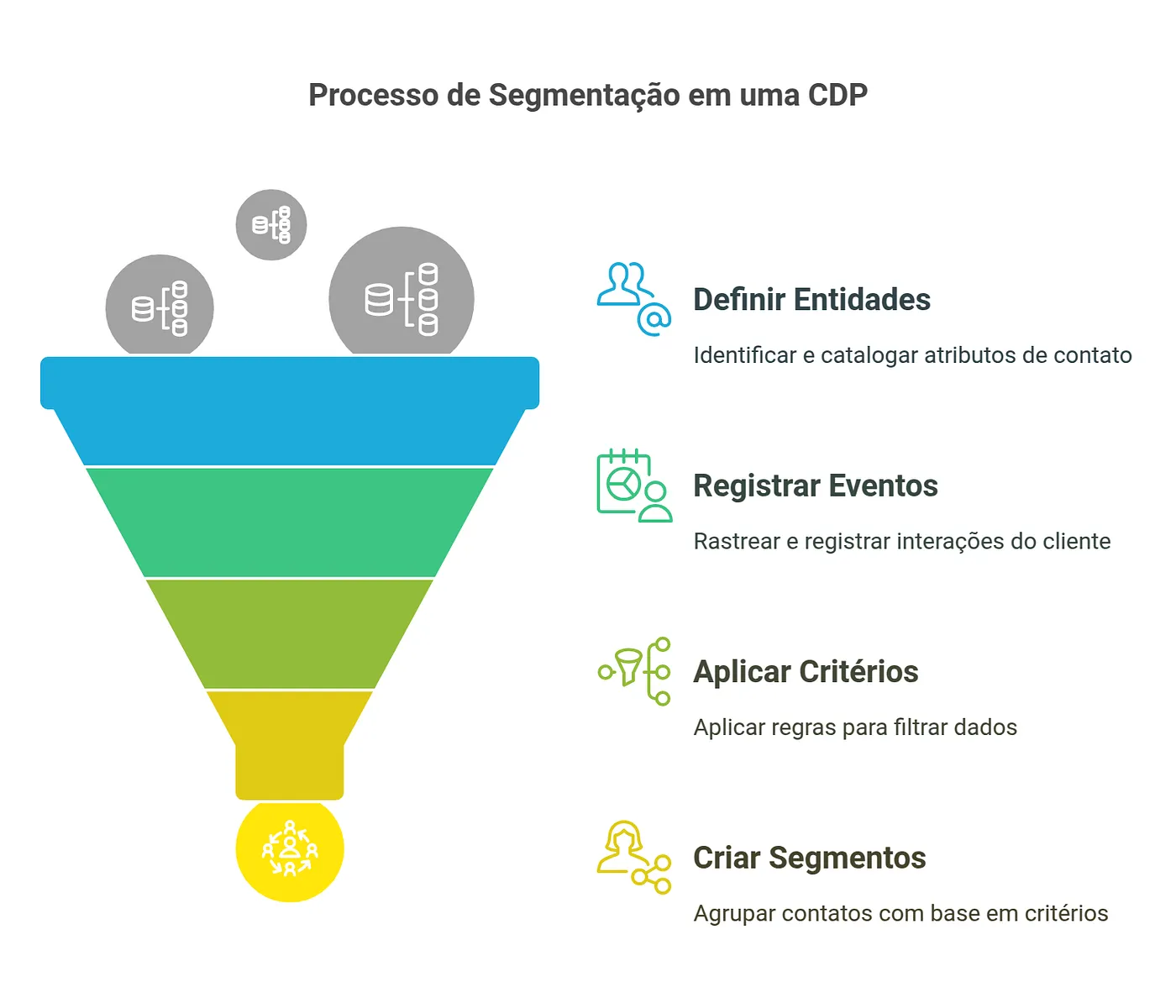
Segmentation is the process of splitting a large set of entities (contacts, users, customers, products, etc.) into smaller, more homogeneous groups based on specific criteria. I’ll use the contact entity in the examples.
In a CDP, segmentation helps you:
- Group contacts with similar traits
- Identify audiences for marketing campaigns
- Personalize experiences from contact behavior
- Compare groups analytically
For example, you might define a “Premium customers” segment including everyone who spent more than $1,000 in the last 3 months, made at least 5 purchases, and visited your site more than 10 times.
A basic segmentation model can be expressed as:
- Entities: contacts with properties and attributes (name, email, age, etc.)
- Events: interactions such as purchases, site visits, conversions, etc.
- Criteria: rules for segment membership (e.g. age > 30 AND country = “Brazil”)
The workflow evaluates each entity against each segment’s criteria. That can be computationally heavy at scale, especially with many segments and complex rules.
Scope of this post
We’ll focus on:
- Creating UDFs for different comparison operators
- Defining tables for entities and segmentation criteria
- Writing queries that apply criteria to entities
- Building a materialized view to keep segmentation results updated
What we won’t cover:
- Deduplication of segmentation state over time
- Tracking entries and exits from segments over time
- Optimizations for very large data volumes
- OR logic between filters
- Performance and scale tuning in depth
- Nested properties (e.g.
address.city)
The code
Tables
The entities table stores contacts. We already know it from the previous post.
CREATE TABLE entities
(
    tenant_id UInt32,
    entity_id String,
    properties JSON,
    event_time DateTime64(6),
    version UInt64 MATERIALIZED toUnixTimestamp64Nano(event_time)
)
ENGINE = ReplacingMergeTree(version)
ORDER BY (tenant_id, entity_id);
The criteria table defines segmentation rules:
CREATE TABLE criteria
(
    tenant_id UInt32,
    segment_id String,
    filters Array(
        Tuple(
            property_path String,  -- e.g. 'city'
            operator String,       -- e.g. 'eq'
            value String,          -- e.g. 'São Paulo'
            data_type String       -- e.g. 'string'
        )
    ),
    version UInt32 DEFAULT 1
)
ENGINE = ReplacingMergeTree(version)
ORDER BY (tenant_id, segment_id);
Each row stores segment criteria: the rules that decide which entities belong to a segment. For instance, a “VIP customers” segment might require “total purchases above 1000” and “account status active”. Each row is one segment configuration for a tenant.
The filters column is an Array of tuples:
property_path: property name on the entity (e.g.city)operator: comparison operator (e.g.eq,gt,contains)value: comparison value (e.g.São Paulo,1000)data_type:string,number,boolean, etc., so comparisons cast correctly
Example filter:
[
    ('total_purchases', 'gt', '1000', 'number'),
    ('status', 'eq', 'active', 'string')
]
Read as: “The contact must have more than 1000 purchases AND status equal to ‘active’.”
Why is the logic only AND?
In this example, every condition in the filters array must pass for an entity to belong to the segment - so logic is AND across filters. You cannot express OR or nested groups like (A AND B) OR C. For example:
[
    ('age', 'gt', '30', 'number'),
    ('plan', 'eq', 'premium', 'string')
]
Read as: “Age greater than 30 AND plan equal to premium.”
Later I may refactor toward:
- Storing individual conditions in a separate table
- Associating each condition with multiple segments
- Supporting flexible combinations (
AND,OR,NOT)
That would allow reusing conditions across segments so each criterion is evaluated once even when it appears in many segments - but that’s material for another post.
Practical criteria example
Create a segment:
INSERT INTO criteria (tenant_id, segment_id, filters)
VALUES (
    1,
    'vip-users',
    [
        ('total_purchases', 'gt', '1000', 'number'),
        ('status', 'eq', 'active', 'string')
    ]
);versiondefaults to1.
Update the segment:
INSERT INTO criteria (tenant_id, segment_id, filters, version)
VALUES (
    1,
    'vip-users',
    [
        ('total_purchases', 'gt', '5000', 'number'),  -- Stricter rule
        ('status', 'eq', 'active', 'string')
    ],
    2  -- Manually bumped version
);ReplacingMergeTreewill prefer version2over1.
Query (with FINAL for a clean read):
SELECT *
FROM criteria
FINAL
WHERE tenant_id = 1 AND segment_id = 'vip-users';
┌─tenant_id─┬─segment_id─┬─filters────────────────────────────────────────────────────────────────────────────────┬─version─┐
1. │ 1 │ vip-users │ [('total_purchases','gt','5000','number'),('status','eq','active','string')] │ 2 │
└───────────┴────────────┴────────────────────────────────────────────────────────────────────────────────────────┴─────────┘Creating UDFs
We add small functions for each comparison family. They decide whether a contact satisfies one filter.
Strings:
CREATE FUNCTION compareStrings AS (op, value, target) ->
    multiIf(
        op = 'eq', value == target,
        op = 'neq', value != target,
        op = 'contains', position(value, target) > 0,
        op = 'starts_with', startsWith(value, target),
        false
    );
Numbers:
CREATE FUNCTION compareNumbers AS (op, value, target) ->
    multiIf(
        op = 'eq', value == target,
        op = 'neq', value != target,
        op = 'gt', value > target,
        op = 'gte', value >= target,
        op = 'lt', value < target,
        op = 'lte', value <= target,
        false
    );
Booleans:
CREATE FUNCTION compareBooleans AS (op, value, target) ->
    multiIf(
        op = 'eq', value == target,
        op = 'neq', value != target,
        false
    );
Dispatcher by data type:
CREATE FUNCTION filterMatches AS (type, value, op, target) -> multiIf(
  type == 'string',
    compareStrings(op, value, target),
  type == 'number',
    compareNumbers(op, accurateCastOrNull(value, 'Float64'), accurateCastOrNull(target, 'Float64')),
  type == 'boolean',
    compareBooleans(op, accurateCastOrNull(value, 'Bool'), accurateCastOrNull(target, 'Bool')),
  type == 'datetime',
    compareNumbers(op, toUnixTimestamp64Nano(accurateCastOrNull(value, 'DateTime64')),
                      toUnixTimestamp64Nano(accurateCastOrNull(target, 'DateTime64'))),
  NULL
);
Quick tests:
-- Condition holds
SELECT filterMatches('string', 'John Silva', 'eq', 'John Silva') AS result;

-- Condition fails
SELECT filterMatches('number', '35', 'lt', '30') AS result;

-- Datetime comparison
SELECT
   filterMatches(
      'datetime',
      '2023-01-15 10:30:00',
      'gt',
      '2023-01-15 10:00:00'
   ) AS result;

-- Two conditions
SELECT
    filterMatches('string', 'John Silva', 'eq', 'John Silva') AS result1,
    filterMatches('number', '35', 'gt', '30') AS result2;

-- N conditions via arrayAll
SELECT
   arrayAll(
      filter -> (
         filterMatches(filter.1, filter.2, filter.3, filter.4) = 1
      ),
      [
        ('string', 'John Silva', 'eq', 'John Silva'),
        ('number', '35', 'gt', '30')
      ]
   ) AS result;
-- first query
┌─result─┐
1. │ 1 │
└────────┘
-- second
┌─result─┐
1. │ 0 │
└────────┘
-- datetime
┌─result─┐
1. │ 1 │
└────────┘
-- two columns
┌─result1─┬─result2─┐
1. │ 1 │ 1 │
└─────────┴─────────┘
-- arrayAll
┌─result─┐
1. │ 1 │
└────────┘Applying criteria and segmenting contacts
Query that applies criteria to entities:
SELECT
    e.tenant_id,
    c.segment_id,
    e.entity_id
FROM entities AS e
INNER JOIN criteria AS c ON e.tenant_id = c.tenant_id
WHERE arrayAll(
    filter -> filterMatches(
      filter.data_type,
      JSONExtractString(e.properties::String, filter.property_path),
      filter.operator,
      filter.value) = 1,
    c.filters
);
What it does:
- Joins
entitiesandcriteriaontenant_id - For each entity–criteria pair, evaluates every filter in
filters arrayAllenforces all filters must passfilterMatchespicks the right comparison perdata_typeJSONExtractStringreads paths from the JSONproperties
Insert sample criteria and entities:
INSERT INTO criteria (tenant_id, segment_id, filters) VALUES
(1, 'high_fit',
    [
        ('industry', 'eq', 'Marketing', 'string'),
        ('company_size', 'gte', '50', 'number'),
        ('job_title', 'contains', 'CEO', 'string'),
        ('budget', 'gte', '10000', 'number')
    ]
),
(1, 'high_interest',
    [
        ('website_activity', 'gte', '70', 'number'),
        ('email_engagement', 'gte', '50', 'number'),
        ('trial_used', 'eq', 'true', 'boolean'),
        ('last_activity', 'gte', '2025-02-01', 'datetime')
    ]
);

INSERT INTO
   entities (tenant_id, entity_id, properties, event_time)
VALUES
   (
      1,
      'lead_001',
      '{"industry": "Marketing", "company_size": 100, "job_title": "CEO", "website_activity": 80, "email_engagement": 60, "trial_used": true, "budget": 15000, "last_activity": "2025-02-15"}',
      now()
   ),
   (
      1,
      'lead_002',
      '{"industry": "Retail", "company_size": 30, "job_title": "Marketing Manager", "website_activity": 50, "email_engagement": 30, "trial_used": false, "budget": 5000, "last_activity": "2025-01-20"}',
      now()
   ),
   (
      1,
      'lead_003',
      '{"industry": "Marketing", "company_size": 80, "job_title": "CTO", "website_activity": 90, "email_engagement": 80, "trial_used": true, "budget": 20000, "last_activity": "2025-02-10"}',
      now()
   );
Run the same SELECT as above:
   ┌─tenant_id─┬─segment_id────┬─entity_id─┐
1. │         1 │ high_fit      │ lead_001  │
2. │         1 │ high_interest │ lead_001  │
3. │         1 │ high_interest │ lead_003  │
   └───────────┴───────────────┴───────────┘
Interpretation:
lead_001is inhigh_fitlead_001is also inhigh_interestlead_003is inhigh_interestlead_002is in neither segment
Segment high_fit
Rules:
industryequalsMarketingcompany_size≥ 50job_titlecontainsCEObudget≥ 10000
lead_001: all four pass → member.
lead_002: industry is Retail, not Marketing → not a member (fails immediately).
Same reasoning extends to the other leads.
Materialized view
Picture:
entities: millions of rows, dynamic JSON propertiescriteria: hundreds of segments, each with multiple filters- You need fast answers to: “Which contacts belong to segment X?”
A plain query each time would scan entities, join criteria, and re-run comparisons - expensive at scale. A materialized view stores precomputed results on disk so reads avoid recomputing everything. Unlike a normal view (just a saved query), the MV persists rows. See ClickHouse’s docs on incremental materialized views.
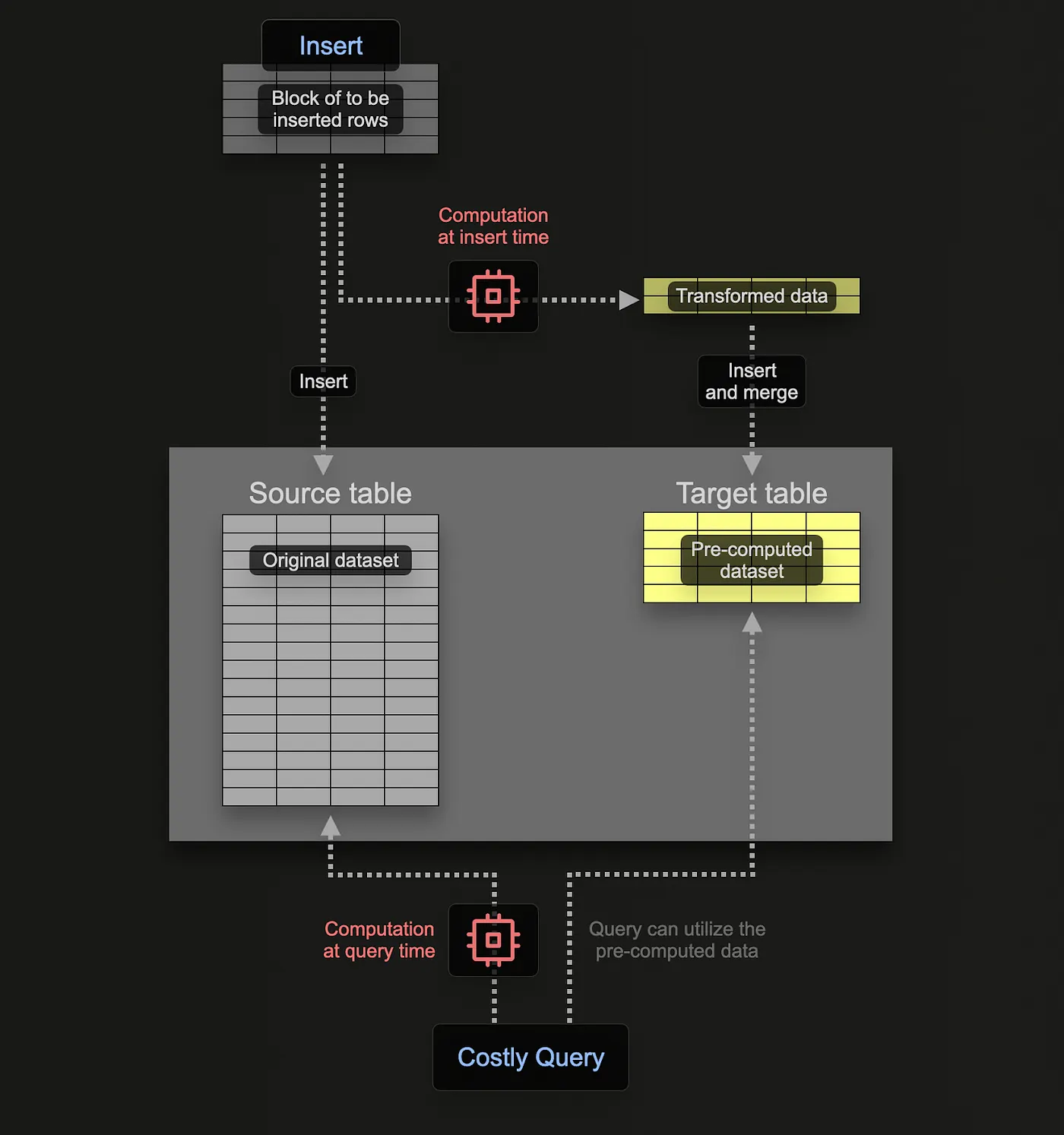
We want segmentation results updated on write as new contacts land.
The MV segment_membership_mv reads from entities and criteria and stores:
tenant_idsegment_idfilters(the segment’s criteria snapshot)entity_idproperties
In the GitHub repo, the target table segment_membership is created before the MV - tune ENGINE and ORDER BY for your case.
CREATE MATERIALIZED VIEW segment_membership_mv
TO segment_membership
AS SELECT
    e.tenant_id,
    c.segment_id,
    c.filters,
    e.entity_id,
    e.properties
FROM entities AS e
INNER JOIN criteria AS c ON e.tenant_id = c.tenant_id
WHERE arrayAll(
    filter -> filterMatches(
      filter.data_type,
      JSONExtractString(e.properties::String, filter.property_path),
      filter.operator,
      filter.value) = 1,
    c.filters
);
Same WHERE as the ad-hoc query. On each insert into entities, matching rows are appended to segment_membership without reprocessing the whole table.
Example
Premium users in São Paulo:
INSERT INTO criteria (tenant_id, segment_id, filters) VALUES
(1,'premium_sp',
    [
      ('is_premium', 'eq', 'true', 'boolean'),
      ('city', 'eq', 'São Paulo', 'string')
    ]
);
INSERT INTO entities (tenant_id, entity_id, properties, event_time) VALUES
(1, 'user1', '{"is_premium": true, "city": "São Paulo"}', now()),
(1, 'user2', '{"is_premium": false, "city": "Rio de Janeiro"}', now());SELECT * FROM segment_membership; ┌─tenant_id─┬─segment_id─┬─filters───────────────────────────────────────────────────────────────────┬─entity_id─┬─properties─────────────────────────────┐
1. │ 1 │ premium_sp │ [('is_premium','eq','true','boolean'),('city','eq','São Paulo','string')] │ user1 │ {"city":"São Paulo","is_premium":true} │
└───────────┴────────────┴───────────────────────────────────────────────────────────────────────────┴───────────┴────────────────────────────────────────┘user1 matched premium_sp at insert time.
Conclusion
We walked through testing ClickHouse functions with a segmentation-style example: UDFs for comparisons, a criteria model with tuple arrays, queries using arrayAll and JSONExtractString, and a materialized view to persist memberships. Everything here is educational - production systems need hardening and optimization.
As I keep learning, the GitHub repository may diverge from this post; I’ll refine the setup and experiment with new ideas. Contributions and feedback are welcome.